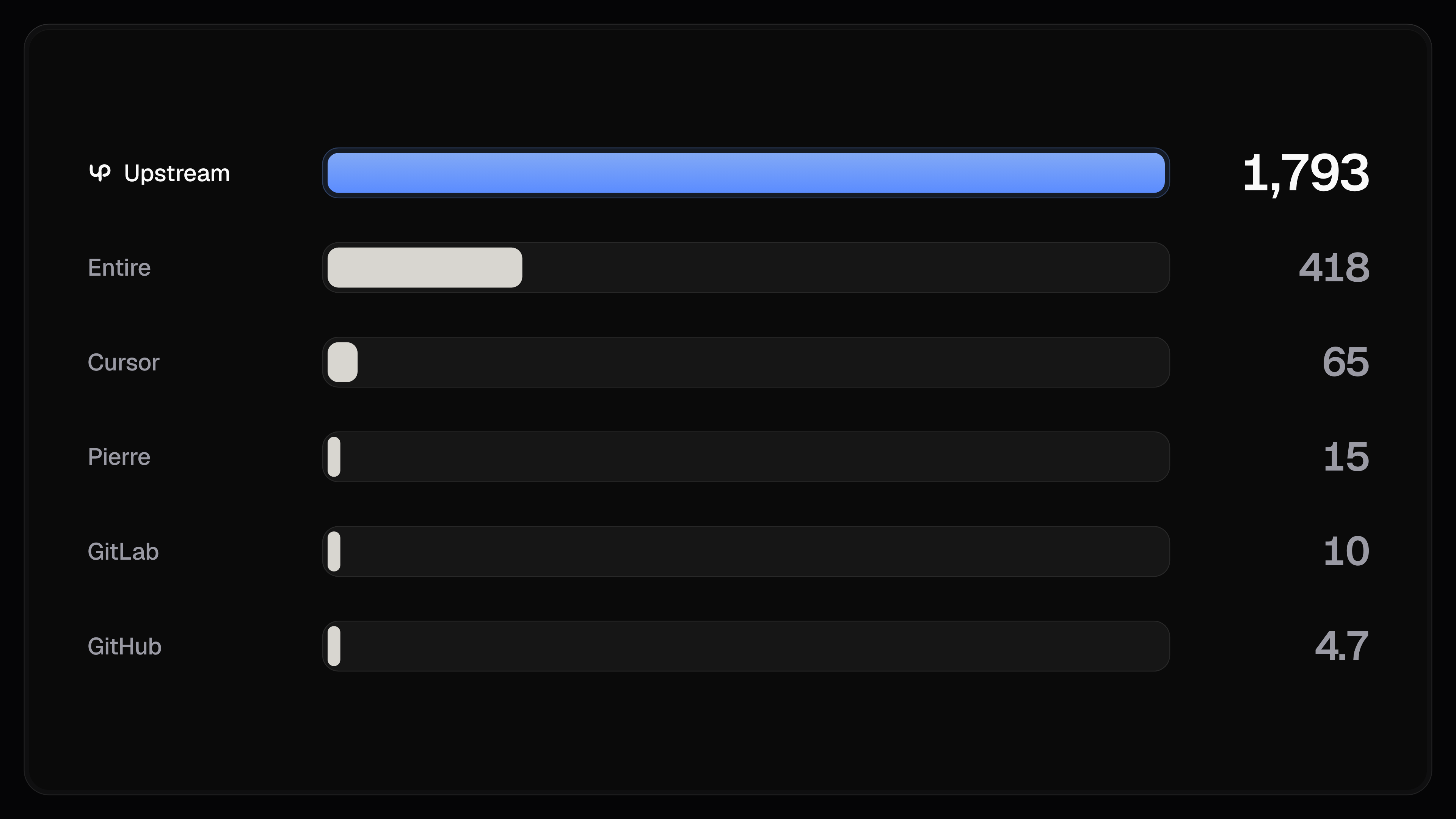
Upstream Rapid is our new Git engine on Coline Upstream and upstream.codes, and soon the engine for Onset, our new Git alternative (coming super soon!). On ForgeMark, Entire's benchmark for Git forges, it handles nearly 1,800 pushes a second to a single repository, whereas GitHub takes 4.7.
Why repos get slow
Every push is three steps. Git asks the server which branches there are and where they point, sends over whatever the server's missing, and then asks it to move your branch to your new commit. If someone else moved it first, the server says no.
That last step is what keeps a branch from losing work. It's also where forges slow down. On most forges, a repo's branches move one push at a time. A normal human who pushes a few times an hour will never notice. A team (or even one person these days) running a hundred agents in one repo does, because agents might be pushing every few seconds, and every push waits behind the others.
The limit has nothing to do with how many branches you push to. Two agents on two branches never touch each other's work, but on a typical forge they still have to wait in line, because the line belongs to the repository.
One rule
Almost every decision in Rapid comes from one rule. A push should touch as few parts of the repo as it can, and write to each of them once.
Every part a push touches is somewhere it can end up waiting, and every write has to be saved before the push can finish.
A repository is a group of small pieces
We wrote the engine in Rust (obviously), compiled to WebAssembly so it runs on Cloudflare Workers, in whichever of Cloudflare's data centres is closest to you. It also runs natively in containers for jobs too big for Workers. Each repo is a set of Durable Objects (small programs with their own storage that Cloudflare wakes up when called). Instead of one machine per repo, Rapid gives each repo several of these, and each one has one job.
- Sixteen push lanes take pushes. Each lane owns some of the repository's branches and handles every push to them.
- Four copies of the branch list answer the question every push and fetch starts with.
- One coordinator handles the changes that touch more than one lane, like creating or deleting a branch, changing the default branch, or forking the repository.
- Merge objects combine stored pushes in the background, so the lanes never stop to do it.
Faster than every other forge that has published a number
A normal push to an existing branch doesn't turn on the coordinator. It goes to a lane and the branch list copies. A piece with nothing to do goes to sleep, and a sleeping Durable Object costs nothing. A repository nobody is pushing to only costs its storage.
Where branches live
A branch always goes to the same lane. Rapid hashes the branch's full name and uses it to pick one of the sixteen lanes, so the lane that took an agent's last push is the one that takes its next.
Two branches can share a lane, and in a busy repository many do. That's fine. A single lane can take more than a hundred pushes a second, and what matters is that one lane never waits for another. Pushes to main and to agent/fix-login might land in the same lane, while a push to claude/refactor-auth lands in a different one and goes through at the same moment.
One push, start to finish
Git takes 46 ms starting up and opening a connection, and then asks for the branch list. The Worker nearest to you reads it from one of the four copies, which takes about 27 ms on Cloudflare's side and 39 ms there and back. Git then packs the commit in ~5 ms and sends it.
The Worker sends the push to the lane that owns the branch. The lane reads the objects git sent and checks that every one of them links to something the repository already has, so a push can't have a branch pointing at history that isn't there. It then writes the new objects and the branch move together as a single write.
Cloudflare copies that write to other data centres before it tells the lane it's saved, which took ~15 ms in this example. Only then does the lane update the four copies of the branch list and reply. A push never succeeds before it's saved, and no one ever sees a branch at a commit that could still be lost.
Waiting on the right thing
Most of the work of making Rapid fast was removing waits that didn't need to be there.
The branch list is one example. Every push and fetch begins by reading it, and a single Durable Object answers about a thousand calls a second. With one copy, that would be the ceiling for the whole repository, no matter how many lanes it had, but with four, reads spread across the copies. A lane updates all four before it answers, so you always see your own push in the next read.
Saving is another. By default, a Durable Object holds every message it sends until all of its earlier writes are saved. That's a safe default, but under a steady stream of pushes it means every reply waits for the next save, including saves that belong to other pushes. A call that took 3 ms on its own took 28 ms behind someone else's write. Rapid's lanes write a push without holding everything else back, then wait for that particular write to be saved before they answer. Each push waits for its own save and nobody else's.
Stored once, never changed
Every push is stored as a layer, which is the pack git sent plus an index of the objects in it. Small layers stay in the lane's own storage and bigger ones go to R2.
A layer never changes after it's written, so any Worker can keep a copy of it for as long as it likes. The copy can never go stale. Clones and fetches come from a data centre near you, and a full clone streams layers straight out of storage without unpacking them first.
Thousands of tiny layers would make every read slower, so they don't stay tiny. A busy lane reports its pushes as one layer every half second instead of one per push, and the merge objects combine layers in the background. When they merge, they store each file and folder as a small change against its previous version, the way git's own packs do.
On one of our own repositories, merging took 46 layers and 290 MB down to a single layer of 12.3 MB. A clone of it went from 8.72 seconds to 2.07.
Big repositories
Some work doesn't fit in a Worker. Big merges, imports, backups and very large pushes run in a container with the same engine. A push over 24 MB streams into R2 first, and the container reads it from there, so a single git push can be up to 5 GB (GitHub stops at 2 GB). A file can be up to 256 MB, and there's zero limit on how big a repository can get (for now until someone ends up abusing this).
Normal pushes to a big repository still go through the lanes, because a lane only needs the objects a push touches, not the whole history. We checked this by putting all of Chromium into Rapid, every commit since 2008, 28 million objects and 55 GB (shout out @barre_of_lube for asking for this test). Then we had 1,000 agents pushing to it at once, 250 each from Oregon, Virginia, the Netherlands, and Tokyo.
Rapid came in at 1,220 pushes a second. The same 1,000 agents pushing to a brand new, empty repository got 1,238, so the size of the repository made almost no difference (normal deviation between runs). Distance changed how long each push took, with a median of 473 ms from Oregon and 754 ms from the Netherlands, but not how many pushes the repository could take.
Where 1,793 comes from
Pushes a second is the number of agents divided by how long each push takes. With 1,024 agents pushing to one repository for three minutes, each push took about half a second, and Rapid took 1,793 of them every second with no errors.
Most of that half second is distance and the save. Our bench machine is in Oregon and the repository is in San Jose, so every push has to take two round trips between them, and every save waits for other data centres to confirm it. Servers that keep everything on one local disk, next to the machine running the benchmark, could make a single push quicker. They'd also run all day whether anyone pushed or not, which is why didn't go with that route since it makes no sense economically for us right now, even though our numbers would be a lot higher.
Try it out!
Rapid is normal Git, so git, your editor and your CI work with it exactly as they do today. It runs every repository on every Upstream plan, including Free.
Make a repository on upstream.codes and push to it.